GeometryReader
자식 View에 부모 View와 기기에 대한 크기 및 좌표계 정보를 전달하는 기능을 수행하는 ContainerView
GeometryReader의 영역에 대한 레이아웃 정보가 content로 들어가는 View에게 제공된다.
@available(iOS 13.0, macOS 10.15, tvOS 13.0, watchOS 6.0, *)
@frozen public struct GeometryReader<Content> : View where Content : View {

    public var content: (GeometryProxy) -> Content

    @inlinable public init(@ViewBuilder content: @escaping (GeometryProxy) -> Content)

    /// The type of view representing the body of this view.
    public typealias Body = Never
}
content의 @ViewBuilder를 통해 ZStack과 동일하게 겹겹이 쌓이는 계층 구조를 갖는다.
크기를 지정해주지 않아도 부모 View에서 꽉 채울 수 있을 만큼 View가 알아서 확장하는 Push-out View이다.
GeometryProxy
@available(iOS 13.0, macOS 10.15, tvOS 13.0, watchOS 6.0, *)
public struct GeometryProxy {

    /// The size of the container view.
    public var size: CGSize { get }

    /// Resolves the value of `anchor` to the container view.
    public subscript<T>(anchor: Anchor<T>) -> T { get }

    /// The safe area inset of the container view.
    public var safeAreaInsets: EdgeInsets { get }

    /// Returns the container view's bounds rectangle, converted to a defined
    /// coordinate space.
    public func frame(in coordinateSpace: CoordinateSpace) -> CGRect
}
GeometryReader의 레이아웃 정보(= 부모 View의 정보)를 자식 뷰에 제공한다.
safeAreaInsets
- GeometryReader가 사용된 환경에서의 SafeArea에 대한 크기를 반환
frame(.in)
- 특정 좌표계를 기준으로 한 프레임의 정보를 제공한다.
subscript(anchor:)
- 자식 뷰에서 anchorPreference Modifier를 이용해 제공한 좌표나 프레임을 지오메트리 리더의 좌표계를 기준으로 다시 변환하여 사용하는 첨자.
Frame
GeometryProxy의 프레임은 그 자신의 CGRect 값이 아니라 CoordinateSpace 열거형에 정의된 좌표공간에 관한 정보를 반환한다.
@available(iOS 13.0, macOS 10.15, tvOS 13.0, watchOS 6.0, *)
public enum CoordinateSpace {

    case global

    case local

    case named(AnyHashable)
}
| global | 화면 전체 영역(윈도우 bounds)를 기준으로 한 좌표 정보 |
| local | GeometryReader의 bounds를 기준으로 한 좌표정보 |
| named | 명시적으로 이름을 할당한 공간을 기준으로 한 좌표 정보 |
struct CustomView: View {

    var body: some View {
        HStack(spacing: 10) {
            Rectangle().fill(Color.yellow).frame(width: 30)

            VStack(spacing: 10) {
                Rectangle().fill(Color.blue).frame(height: 200)

                GeometryReader { g in
                    VStack {
                        Text("Local").bold()
                        Text(stringFormat(for: g.frame(in: .local).origin))
                            .padding(.bottom)

                        Text("Global").bold()
                        Text(stringFormat(for: g.frame(in: .global).origin))
                            .padding(.bottom)

                        Text("namedVStackCS").bold()
                        Text(stringFormat(for: g.frame(in: .named("VStackCS")).origin))
                            .padding(.bottom)

                        Text("namedHStackCS").bold()
                        Text(stringFormat(for: g.frame(in: .named("HStackCS")).origin))
                            .padding(.bottom)
                    }
                }
                .background(Color.green)
                .border(Color.red, width: 4)

            }
            .coordinateSpace(name: "VStackCS")
        }
        .coordinateSpace(name: "HStackCS")
        .ignoresSafeArea()
    }

    func stringFormat(for point: CGPoint) -> String {
        String("x: \(point.x), y: \(point.y)")
    }
}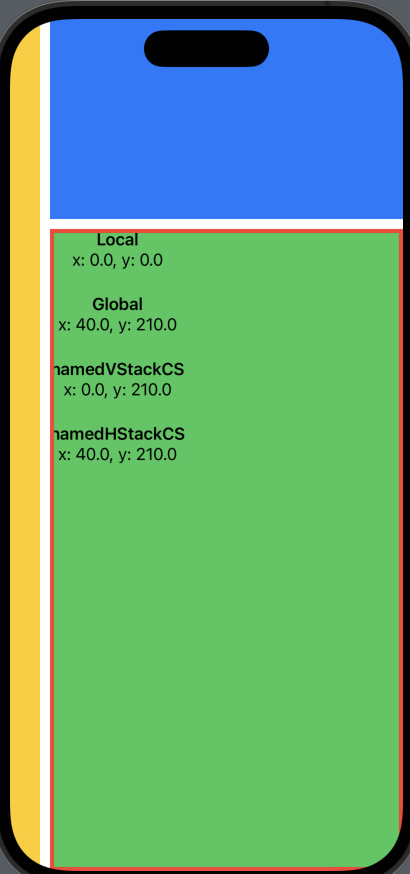
위 코드의 GeometryReader에 담겨진 GeometryProxy에는 HStack 내부에 있는 초록색 영역의 레이아웃 정보가 contentView에 제공된다.
이 때 frame(in: 좌표계)는
local
- GemometryReader의 Bounds를 기준으로 한 값이니까 origin을 출력하면 당연히 (0.0, 0.0)이 출력된다.
global
- 화면 전체 영역(window의 Bounds) 에서의 origin 값이니
(x: HStack에 들어있는 Yellow의 width 30 + HStack의 Spacing, y: safeArea ignore 했으니 파란색 영역 height 200 + VStack spacing)이 출력됨
namedVStackCS
- 초록색 영역의 부모 View에 .coordinatedSpace("VStackCS")가 걸려있으니, 파랑 뷰 + 초록 뷰가 담긴 VStack을 기준으로 초록 뷰의 origin이 출력된다.
- (x: 0.0, y: 파란색 영역 + Spacing)
namedHStackCS
- HStack은 최상위 ContainerView니까 이 경우엔 global과 동일하다.
ScrollView 안에서 GeometryReader를 사용하는 경우
struct CustomView: View {
    var body: some View {
        HStack(spacing: 10) {
            Rectangle().fill(Color.yellow).frame(width: 30)

            ScrollView {
                VStack(spacing: 0) {
                    Rectangle().fill(Color.blue).frame(height: 300)

                    GeometryReader { g in
                        VStack {
                            Text("Global").bold()
                            Text(stringFormat(for: g.frame(in: .global).origin))
                                .padding(.bottom)

                            Text("scrollViewCoordinateOrigin").bold()
                            Text(stringFormat(for: g.frame(in: .named("scrollViewCoordinate")).origin))
                                .padding(.bottom)

                            Text("scrollViewCoordinateMinY").bold()
                            Text("\(g.frame(in: .named("scrollViewCoordinate")).minY)")
                                .padding(.bottom)

                            Text("scrollViewCoordinateMaxY").bold()
                            Text("\(g.frame(in: .named("scrollViewCoordinate")).maxY)")
                                .padding(.bottom)

                            Text("namedHStackCS").bold()
                            Text(stringFormat(for: g.frame(in: .named("HStackCS")).origin))
                                .padding(.bottom)
                        }
                    }
                    .frame(height: 500)
                    .background(Color.green)
                    .border(Color.red, width: 4)

                }
            }
            .coordinateSpace(name: "scrollViewCoordinate")
        }
        .coordinateSpace(name: "HStackCS")
        .ignoresSafeArea()
    }

    func stringFormat(for point: CGPoint) -> String {
        String("x: \(point.x), y: \(point.y)")
    }
}
VStack을 ScrollView로 감싸고 그 ScrollView의 좌표계 기준으로 GeometryReader에 넘겨지는 Proxy의 값을 보니,
위로 스크롤하면 초록색이 위로 올라가니까 origin.y가 줄어들고,
아래로 스크롤하면 초록색이 아래로 내려가니까 origin.y가 커진다.
뭔가 View로 보면 당연한건데
보통 scrollView로 coordinateSpace를 잡고
그것을 기준으로
proxy.frame(in: .global).minY 요런식으로 사용하니까 헷갈리는것 같다.
예를들어 파란색 View가 1000이었다면 처음에 proxy.frame(in: .global).minY가 1000이었겠지만,
위로 스크롤해서 초록색 View가 나오게 되면 화면 영역(= .global)을 기준으로 화면에 나오는 만큼 350 이런 숫자로 줄어든다.
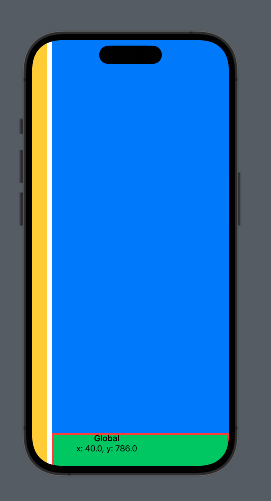
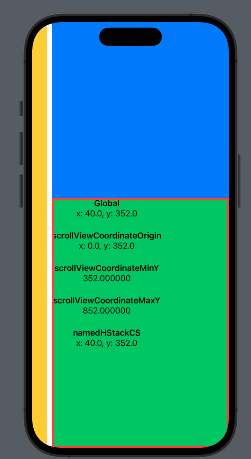
global을 화면에 보이는 영역 외에 뭔가 ScrollView의 전~체 안보이는 영역까지라고 생각하기 쉬운데,
global은 정말 화면에 보이는 영역이라는것을 알아두잣.